Design Philosophy
The Eye of SOFIA utilizes a standard Model-View-Controller design pattern for its top-level structure. All instructions from a user are sent to the “Controller”, which parses the instructions into commands the program can use. The “Model” is responsible for reading, understanding, and storing data in a way that the “View” can understand. The “View” accepts commands from the “Controller” and is responsible for showing the user the requested data in the “Models” in the desired manner.
In the Eye of SOFIA, the role of “Controller” is taken by the
Eye class. It accepts commands
from a user and passes them on to the relevant modules. Commands can come
from multiple places. The standard is through the GUI interface, which is
managed by the “View” classes. It can also be controlled programmatically by
through the Eye API. The redux package for reducing SOFIA data also utilizes
the Eye through the
EyeViewer wrapper. To help
process command and events, particularly from the GUI, the Eye relies
heavily on PyQt5 signals and events, which are described in detail in
Signals.
The “View” is managed by the
View class and is
supported by other classes in the display module. The primary job of the
View class is to manage the GUI, built with PyQt5. The GUI is
composed of two
components: the controls, managed by View, and the figure, managed by
Figure. The figure
utilizes a matplotlib backend to generate and display interactive
plots. The figure supports multiple axes, each of which is managed by an
instance of the Pane
class. The components of each plot, referred to as artists in matplotlib
are managed by the custom class
Artists to
facilitate using blitting techniques for plotting, which are handled by
BlitManager.
The plotting details are described in depth in Plotting.
The “Model” is managed by the
Model class and is
supported by other classes in the models module. Models are created by
reading in a FITS file and parsing the data into a
HighModel
instance. Once the data has been read in, it is immutable; any desired
changes must be made to copies of the models. This is to allow for easy
return to default while exploring the data without having to read in the file
again.
Additional functionality is added by the
utils module, which contains
classes for processing unit conversions, configuring the logger, and defining
custom errors for the Eye.
Module Summaries
For quick reference a quick summary of the purpose of each module follows:
Eye: Interpret instructions from user, command line, or API; load and monitor data; give instructions to View
Controller: Parse command line; start up the Eye
Setup: Connect all PyQt signals and widgets to methods in Eye and View
Signals: Create all custom PyQt signals
Display
Pane: Keep track of Axes, plot configurations (scale, fields, units), create artists.
Figure: Create, arrange, remove, and supervise Panees
View: Supervise GUI, Figure
Drawing: Manages a single artist object for the Eye, handles all updates to artists.
Gallery: Stores and manages all Drawing objects
Blitter: Keep track of Figure background; draw artists
CursorLocation: Show coordinates of cursor location in pop-out window
FittingResults: Show results of curve fitting in pop-out window
ReferenceWindow: Handles loading and displaying spectral reference lines.
Quicklook: General quick plots of data sets
EyeViewer: Act as interface between Eye and Redux
Utils
EyeError: Custom exception for errors encountered in the Eye
Logger: Configure logs
UnitConversion: Handles converting units for all models
ModelFit: Manages model fits made to data
Models:
Model: Initialize a HighModel
HighModel: Defines a model that describes the contents of a single FITS file
MidModel: Defines a model that describes a single observation
LowModel: Defines a model that describes a single measurement
ReferenceData: Manages spectral reference data loaded through ReferenceWindow
Class UML Diagram
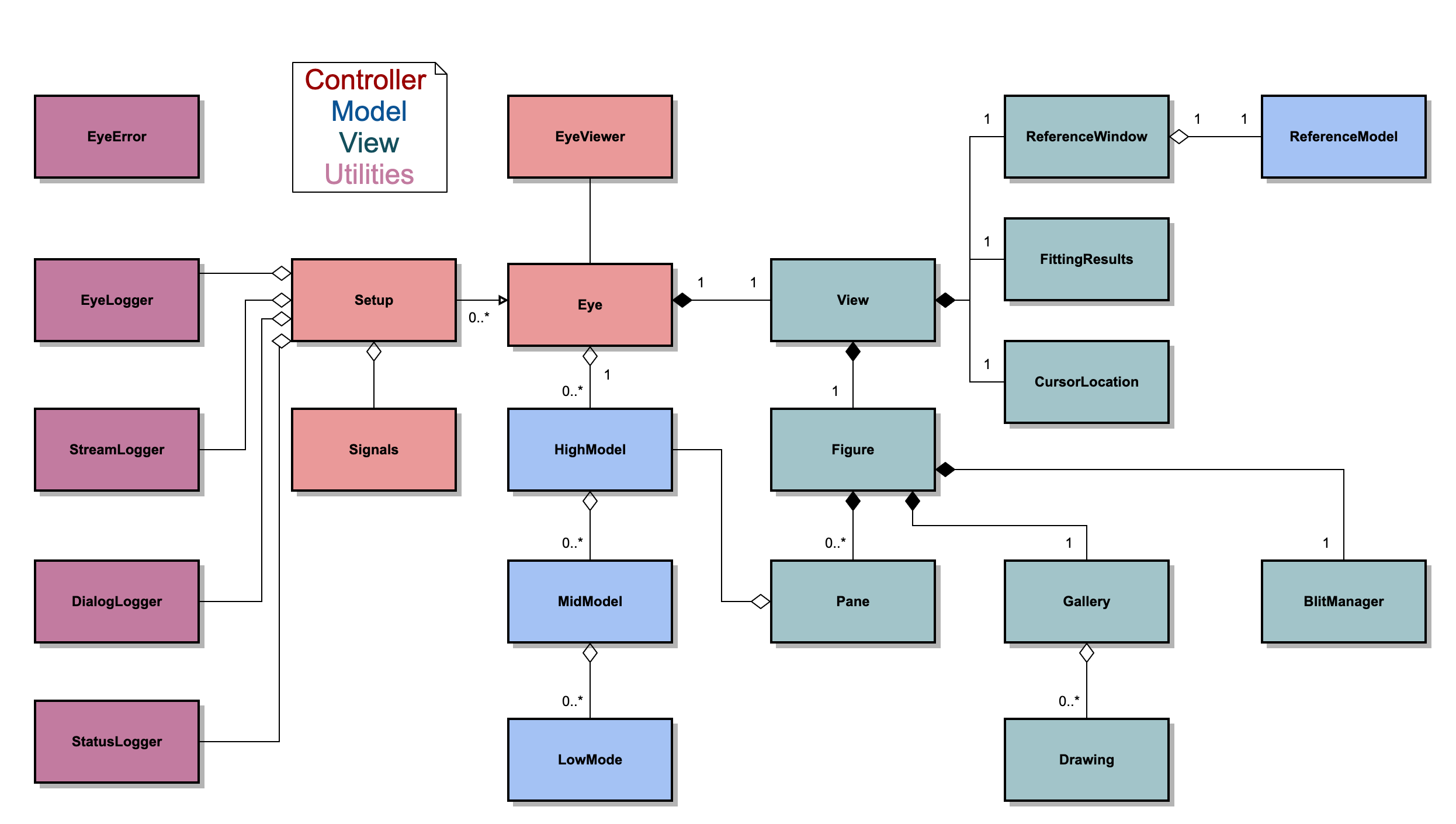
Fig. 10 Class UML diagram for the Eye of SOFIA. The color corresponds to what part of the MVC framework the class belongs. Blue classes make up the “Model”, green classes make up the “View”, and pink classes make up the “Control”. The purple are auxiliary utility modules.